What you will be able to do
- Explain what graph engineering is in one sentence
- Shrink an agent's instructions file to a short identity file
- Turn a process your team repeats into a workflow with steps and gates
- Decide when a graph is worth it and when a plain prompt is enough
Key takeaways
- Graph engineering is designing the graph an agent walks, instead of the prompt it reads.
- The instructions file shrinks to identity: who the agent is, and follow the workflow.
- Process moves into a graph of small workflows: steps, decisions and human gates.
- Rules move into standards, plain markdown files that a step names and reads at that moment.
- The knowledge grows, the prompt does not.
- In a recorded run, a nine-line instructions file finished a six-step task across three separate sessions.
The problem: the instructions file that keeps growing
Every team running an AI coding agent keeps an instructions file. CLAUDE.md, AGENTS.md, .cursorrules. It starts at twenty lines: who the agent is, how the repo is laid out, a few rules.
Then the lessons arrive. A bug the agent caused becomes a rule. A process the team agreed on becomes a paragraph. A routing table appears: "for bugs do this, for features do that, for research do the other thing". Months later the file is hundreds of lines long, and the agent follows some of it.
This is not only a feeling. Anthropic's own Claude Code docs say it: bloated CLAUDE.md files cause Claude to ignore your actual instructions.
Every line added to make the agent better makes every other line weaker. That is the trap graph engineering gets out of.
The definition
Graph engineering is designing the graph an agent walks, instead of the prompt it reads.
The process stops being paragraphs in a file and becomes a graph: nodes (steps) and edges (what happens next). The agent never sees the whole process at once. It sees one step, does exactly that step, and moves on.
Three things replace the big instructions file:
| What it replaces | What replaces it | In one line |
|---|---|---|
| The instructions file | An identity file, under 10 lines | Who the agent is, and "follow the workflow" |
| The process paragraphs | A graph of small workflows | A request enters at one node, a decision sends it to the workflow that owns it, that workflow can start another |
| The rules paragraphs | Standards: plain markdown files, one per topic | The step says which standard to read now. Standards grow forever. The prompt never does |
The line the whole idea hangs on: the knowledge grows, the prompt does not.
The five parts of the graph
| Part | What it is | What it replaces in the prompt |
|---|---|---|
| Step (node) | One unit of work with its own instructions: plan, build, run tests, review | "Always plan before coding, then..." |
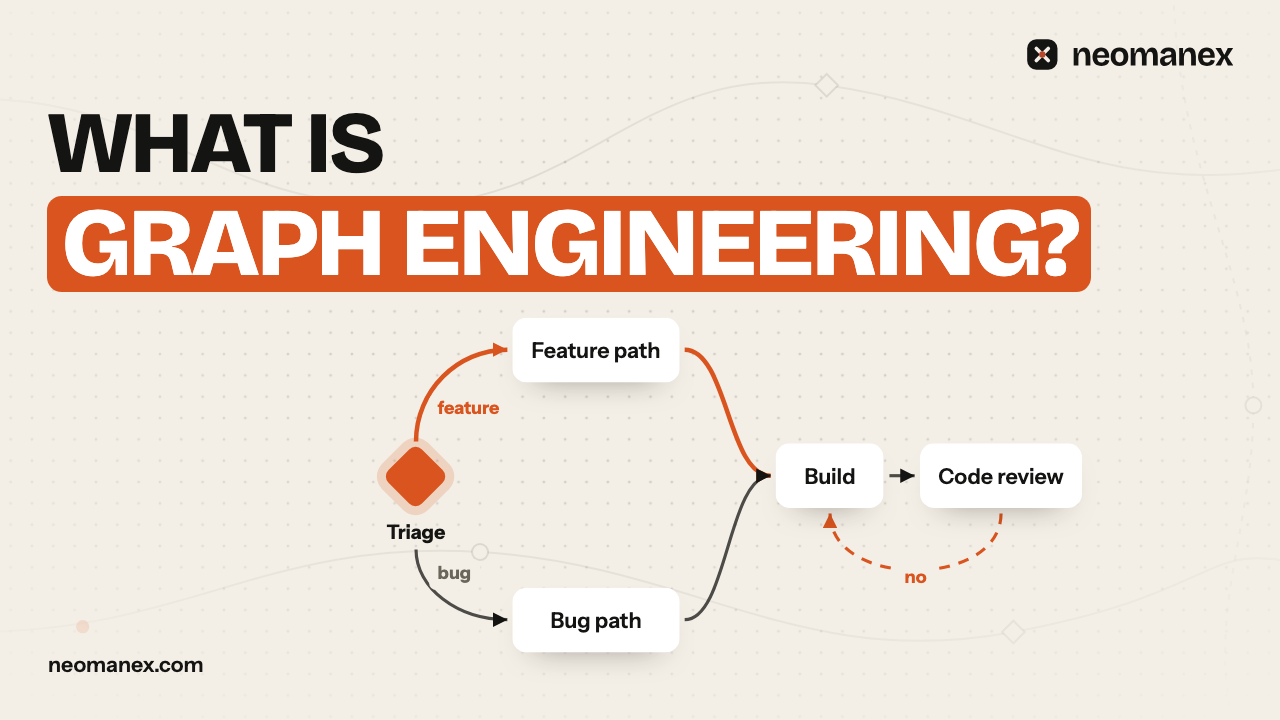
| Decision | A node with several edges. It sends a request down the path that owns it, for example feature or bug | The routing table |
| Gate | A step that stops and waits for a human yes or no. A no can send the work back to a fix step | "Always ask before you..." (obeyed sometimes) |
| Standard | A markdown file the step names and reads at that moment | Rules pasted into the prompt |
| State | The task, its current step and the context each step leaves behind | Re-explaining everything every session |
Why "graph"? Because the work is deciding nodes and edges. Where does a request enter. Which decision sends it where. Which step reads which standard. Where a human has to say yes. That is engineering, and it does not need code: the workflow can be created by describing the process in a conversation.
Proof 1: nine lines, three sessions, one finished task
The first test was the smallest one possible. The agent's whole instructions file was nine lines. Here it is, with the tool names written in plain words:
# Who you are

You are the operator's co-worker in this folder. The task system is your task list and your memory.

# How you work

1. Every request becomes a task: search first, then create one if none exists.
2. The task carries a workflow. Read the current step, do exactly what it says, then advance. Repeat until the workflow completes.
Nothing about planning, testing, approvals or resuming. Then one request went in: add a line to a README. The run was recorded on 2026-09-12:
| Run | What the agent was told | What it did | Where it stopped |
|---|---|---|---|
| 1 | The request | Created a task, the workflow attached itself, wrote a plan | The approval gate after the plan |
| Human | Approved from a different session | ||
| 2 | "Continue where we left off." | Found the open task, read its current step, made the change, wrote a verification report | The approval gate after verification |
| Human | Approved | ||
| 3 | "Continue where we left off." | Found the task again, wrote the learning note, closed it | Completed, 6 of 6 steps |
Three separate sessions, 140 seconds of agent time in total. No session held the state. Each new session turned "continue" into: find the active task, read its step, do that step. Nothing in the instructions file said how.
Proof 2: a real graph, built by talking
The second test was a real development process, described in plain words to an agent with the same short identity file: features and bugs take different paths, a planner writes a plan that waits for approval, bugs start with a failing test, then a shared ending of build, run tests, and a code review that waits for approval and sends the work back on a no.
From that one description the agent built the graph: a decision that routes by task type, a feature path, a bug path, and one shared build-and-review block with a way back from a rejected review. Then one feature went through it on 2026-09-30:
| Step | What happened |
|---|---|
| Decision | Routed to the feature path |
| Plan | The planner agent wrote a plan with seven tests. A human approved it |
| Build and tests | The developer agent built it. 8 tests passed |
| Code review | The reviewer found a test that proved nothing. A human said no |
| Fix, tests, review again | The graph sent the work back to the fix step, then tests, then a second review: no problems |
| Done | Approved, task completed |
In the next session the team asked for a standards review after the tests, with its own fix loop. The agent added it as a small sub-workflow, and the change itself ran through the new step before it was done. The graph grew. The identity file did not change by a single line.
One honest limit from that run: each step leaves its context on the task, but the next agent does not read all of it on its own. The main session passes the approved plan and the findings into the next agent's brief. Graph engineering moves the process out of the prompt. It does not remove the need for a clear handoff between steps.
When graph engineering is worth it
| Situation | Better choice |
|---|---|
| One-off scripts, exploration, a quick question | A plain prompt. A graph is overhead here |
| A process the team repeats: features, bugs, releases, reviews | A graph. Each repeat runs the same steps |
| Several people or agents doing the same kind of work | A graph. The process lives in one place, not in each person's file |
| Work that needs a human yes before it goes further | A graph with gates. A gate is a node, so it is never skipped |
| The instructions file is past a few hundred lines | A graph. Move the process out first, the rules second |
The workflows in both runs above were created by describing them in a conversation with ConvOps.
Steps
Shrink the instructions file
Cut it to identity: who the agent is, and that every request is a task whose workflow it follows.
Write down one repeated process
Describe in plain words a process the team already repeats, including where a human has to approve.
Turn it into a workflow
Make one step per unit of work, and add a gate wherever a human must say yes before the work goes on.
Move the rules into standards
Put the rules for each step into a standard file, and make the step name the file it needs.
Run real work through it
Every time something goes wrong, change the graph or a standard, never the identity file.
Frequently asked questions
What is graph engineering?
Graph engineering is designing the graph an agent walks, instead of the prompt it reads. The process becomes steps and edges, and the agent sees one step at a time.
Does the CLAUDE.md or AGENTS.md file disappear?
No. It shrinks to an identity file of about ten lines: who the agent is, and that every request is a task with a workflow to follow.
Where do the rules go?
Into standards: plain markdown files, one per topic. A step names the standard to read at that moment, so standards can grow without making the prompt longer.
Do I need to write code to build the graph?
No. In both recorded runs the workflow was created by describing the process in a conversation.
When is a plain prompt better than a graph?
For one-off scripts, exploration or a quick question. A graph pays off when the team repeats a process, shares it across people or agents, or needs a human yes before work goes further.
What does graph engineering not solve?
The handoff between steps. Each step leaves its context on the task, but the next agent does not read all of it on its own, so the main session still passes the approved plan and findings into the next brief.