What you will be able to do
- Know what comes back after a delete (committed work, archived files) and what does not.
- Add a deny block to Claude Code settings and know which delete shapes it misses.
- Write a PreToolUse hook that blocks deletes and tells the agent what to do instead, then test it with sample JSON.
- Decide which layers protect your unattended runs, given that they skip prompts.
- Apply the same guard shape in OpenCode and Kimi Code CLI.
Key takeaways
- To stop Claude Code deleting your files, block deletes with a deny rule and a PreToolUse hook, and commit and push so a missed delete has a way back.
- In our scratch runs under --dangerously-skip-permissions, a Claude Code deny rule and a PreToolUse hook each blocked rm; approval prompts never appear in unattended runs.
- Deny rules match command text, so find -delete, /bin/rm and a Python one-liner slipped past them; our hook caught the first two and missed the third, because a hook blocks only what its patterns name.
- A block message that names the safe alternative (move to the project's _archive/ folder) keeps the agent from improvising around the block.
- A text-matching hook over-blocks harmless commands; test it with fixtures and accept the false positive over a missed delete.
If Claude Code deleted your files, only what exists somewhere else comes back. To stop Claude Code deleting files again, push your work, then add a deny rule and a hook. This guide sets up every layer for Claude Code in about 30 minutes and shows what each one misses.
We run a delete guard on every Claude Code session in our own repository. The examples use Marrowby Tiles, a made-up tile shop; the rules and patterns mirror ours.
Claude Code Deleted Files: What Comes Back
The way back is built before the delete, never after.
| Comes back | Stays gone |
|---|---|
| Committed files (local or pushed); only pushed commits survive a lost or wiped folder | Uncommitted files removed by rm, find -delete or a script |
Files a hook redirected into _archive/ instead of deleting | Uncommitted changes wiped by git checkout --, git reset --hard or git restore |
Lost files just now? Run these in order:
- Look in the project's
_archive/folder. - Run
git statusto list missing tracked files. - Committed but not pushed?
git restore --source=HEAD --staged --worktree <path>brings it back from your last local commit. - Run
git fetch, thengit restore --source=origin/main <path>to get a file back as last pushed (swap in your branch name). - If a commit removed the file,
git log --diff-filter=D -- <path>names that commit.
Anything these miss is gone from disk.
Why Claude Code Deletes Files
A prompt protects the person at the keyboard. It does nothing for a run at 3 a.m.
Agents delete for ordinary reasons: asked to "start fresh", Claude Code clears the folder first, and in our scratch test it chose find -delete on its own. Git deletes too: git reset --hard, git clean, git restore, git checkout -- and git stash drop throw away uncommitted work, and a plain git stash hides it until you pop it.
The approval prompt is the weakest layer. People approve what they skim, and our scheduled agent runs use --dangerously-skip-permissions, so no prompt appears.
| Metric | Value | Source |
|---|---|---|
| Dangerous commands caught by human reviewers in a controlled study | 13.6% | Anthropic(opens in new tab), 2026 |
| Dangerous commands caught by Claude Code's auto mode classifier, same study | 89% | Anthropic(opens in new tab), 2026 |
| Files Claude Code allegedly deleted for one developer | 48,000 in 103 seconds | TechRadar(opens in new tab), 2026 |
See how ConvOps puts a sign-off step in front of every merge(opens in new tab), so a delete made during an unattended run never reaches main without a person's yes.
Which Layer Actually Stops a Delete
The deny list is a speed bump. The hook is a wall with known gaps. Pushed work is the floor.
What is a deny rule? A deny rule is a line in Claude Code's settings that refuses any Bash command whose text matches a pattern, such as Bash(rm *).
What is a PreToolUse hook? A PreToolUse hook is a script Claude Code runs before a tool call; when the script exits with code 2, the call is blocked and the agent reads the script's message.
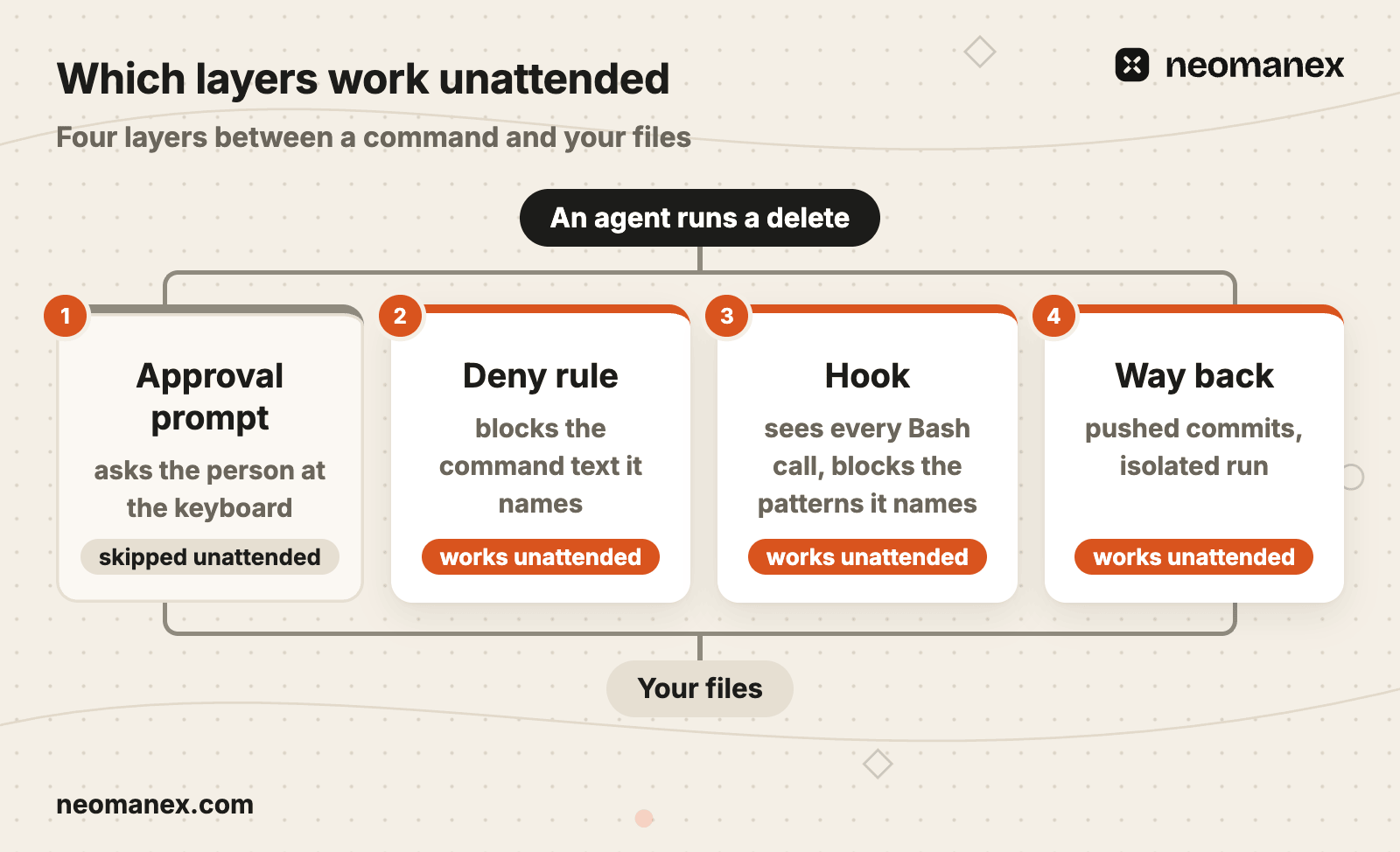
A deny rule and a hook each blocked rm alone in our scratch runs. Neither stopped everything.

Commit and Push Before an Agent Touches Anything
Unpushed work dies with the folder that holds it.
Before you start Claude Code, save everything to the remote:
git status
git add src/ data/products.json
git commit -m "Save work before the agent run"
git push
Start the agent only on a clean tree that is up to date with the remote. Our workflows push each step's output before advancing, and a stop hook blocks ending a session with unpushed work. Run risky work in a git worktree, such as ~/marrowby-shop-run-0412, or in an isolated run that starts from the remote.
Add Deny Rules to Claude Code
Deny rules match the command text, not what the command does.
This block goes in the project's .claude/settings.json:
{
  "permissions": {
    "deny": [
      "Bash(rm *)",
      "Bash(rmdir *)",
      "Bash(git rm *)",
      "Bash(git clean *)",
      "Bash(git reset *)",
      "Bash(git restore *)",
      "Bash(git checkout -- *)",
      "Bash(git stash drop *)",
      "Bash(git stash clear *)",
      "Bash(git push --force *)",
      "Bash(git push -f *)"
    ]
  }
}
Bash(rm *) and the older Bash(rm:*) behaved the same on 2.1.295, even under --dangerously-skip-permissions. Anthropic's permission modes docs(opens in new tab) state that deny rules "block in every mode, including bypassPermissions", and list auto mode as one of those modes. The permissions docs(opens in new tab) also say a deny rule "isn't a security boundary around the program". In our run, find -delete, /bin/rm and a python3 -c one-liner each deleted the file; sh -c 'rm ...' was caught.
Add a Hook That Blocks and Offers a Way Out
A block without an alternative teaches the agent to route around you.
The full .claude/settings.json, with a hooks key next to permissions (hooks guide(opens in new tab)):
{
  "permissions": {
    "deny": [
      "Bash(rm *)",
      "Bash(rmdir *)",
      "Bash(git rm *)",
      "Bash(git clean *)",
      "Bash(git reset *)",
      "Bash(git restore *)",
      "Bash(git checkout -- *)",
      "Bash(git stash drop *)",
      "Bash(git stash clear *)",
      "Bash(git push --force *)",
      "Bash(git push -f *)"
    ]
  },
  "hooks": {
    "PreToolUse": [
      {
        "matcher": "Bash",
        "hooks": [
          {
            "type": "command",
            "command": "python3",
            "args": ["${CLAUDE_PROJECT_DIR}/.claude/hooks/delete-guard.py"],
            "timeout": 5
          }
        ]
      }
    ]
  }
}
${CLAUDE_PROJECT_DIR} points at the project root, so the path holds after the agent changes folder. A wrong script path makes python3 exit 2, so every Bash call is blocked with a can't open file error. That fails closed, and the first command shows it.
And the script, .claude/hooks/delete-guard.py:
import json, re, sys

ARCHIVE = ("file deletion is denied, archive instead: move it to _archive/ "
           "in this project (mkdir -p _archive && mv <path> _archive/)")
PATTERNS = [
    (r"\brm\s+-rf\b", "rm -rf is irreversible recursive deletion, " + ARCHIVE),
    (r"(?<!-)\brm\b", ARCHIVE),
    (r"\brmdir\b", ARCHIVE),
    (r"\bfind\b.*\s-delete\b", ARCHIVE),
    (r"\bgit\s+checkout\s+--\s+", "git checkout -- reverts uncommitted work"),
    (r"\bgit\s+reset\b", "git reset can destroy commit history"),
    (r"\bgit\s+restore\b", "git restore reverts uncommitted work"),
    (r"\bgit\s+clean\b", "git clean deletes untracked files"),
    (r"\bgit\s+stash\b", "git stash can drop uncommitted work"),
    (r"\bgit\s+push\b.*\s(?:-f|--force)\b", "force push overwrites remote history"),
]
MESSAGE_ARG = re.compile(r"""(?:^|\s)(?:-m|--message)(?:=|\s+)(?:"[^"]*"|'[^']*'|\S+)""")

def main():
    try:
        command = json.load(sys.stdin)["tool_input"]["command"]
    except Exception:
        return 0
    scanned = MESSAGE_ARG.sub(" ", command)
    for pattern, reason in PATTERNS:
        if re.search(pattern, scanned):
            print(f"BLOCKED: Destructive command detected.\n  Reason: {reason}\n"
                  f"  Command: {command}", file=sys.stderr)
            return 2
    return 0

sys.exit(main())
Every line has a reason:
- Exit code 2 blocks the call; the agent reads stderr.
(?<!-)\brm\bcatches anyrmtoken,/bin/rmincluded. The lookbehind keepsdocker run --rmallowed.- Unparseable input exits 0: it never jams a session, and it goes unchecked.
- No interpreter pattern.
os.removeandshutil.rmtreeone-liners pass: the hook blocks only what its patterns name.
A hook runs on every Bash call, whatever the agent was told (graph engineering). That is why a rule like this belongs in a hook, not in a CLAUDE.md that keeps growing.
Test the Hook Before You Trust It
An untested regex is a guess.
Pipe a sample payload into the script:
echo '{"tool_name":"Bash","tool_input":{"command":"find exports -mindepth 1 -delete"}}' \
  | python3 .claude/hooks/delete-guard.py; echo "exit $?"
Add one fixture per shape, including expected misses:
| Command | Expected |
|---|---|
rm -rf exports/ | exit 2 |
git checkout -- src/ | exit 2 |
docker run --rm alpine true | exit 0 |
git commit -m "Never rm -rf exports, archive instead" | exit 0 |
python3 -c "import os; os.remove('exports/product-feed.csv')" | exit 0, a known miss |
git push -f origin main | exit 2 |
grep -rn "rm -rf" scripts/ | exit 2, a known over-block |
Finish with one live block: in a scratch folder, ask Claude Code to delete a throwaway file.
One Delete Attempt, Traced
The best block is the one the agent recovers from on its own.
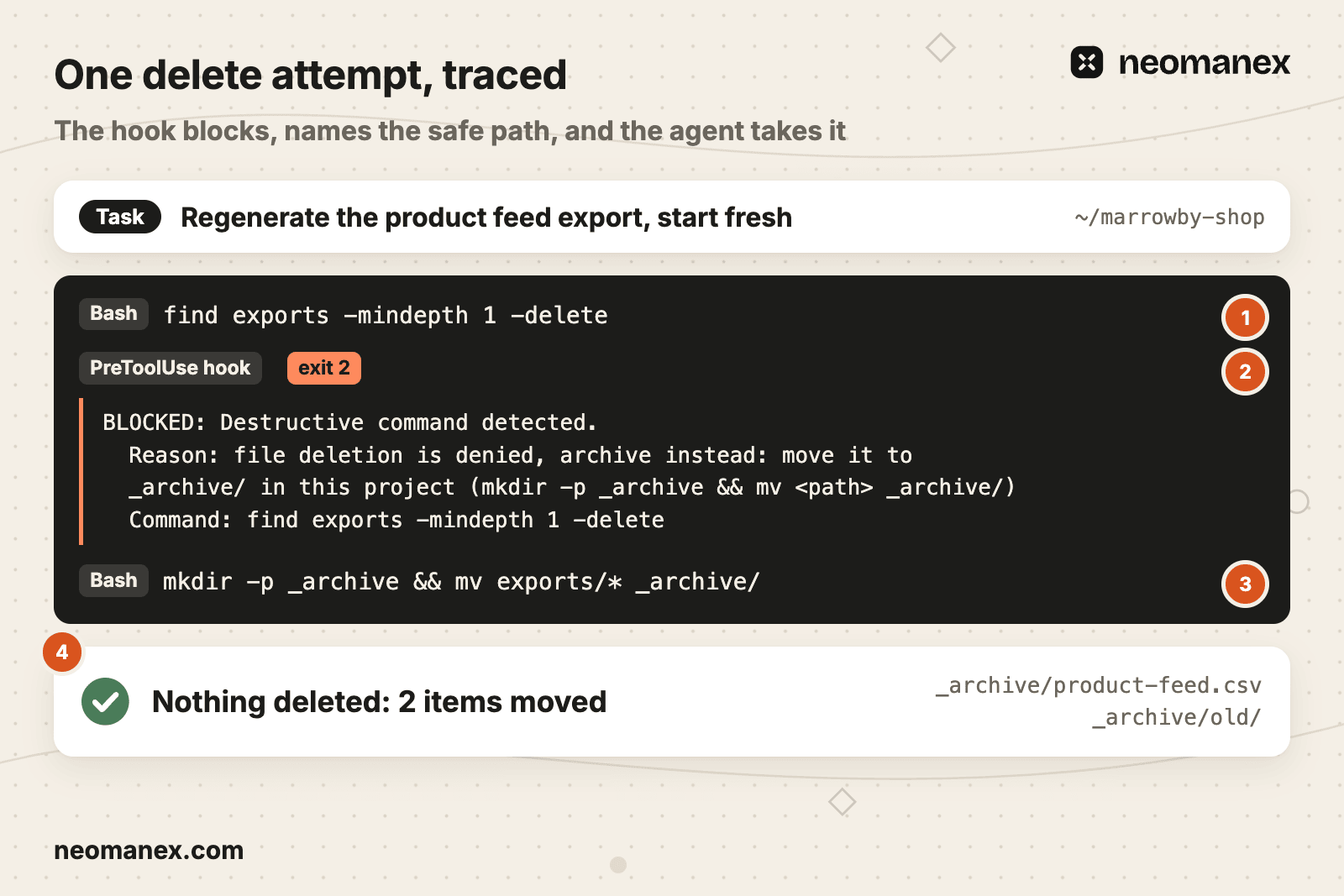
- Trigger. Marrowby Tiles asks: "Regenerate the product feed export, start fresh." The agent runs
find exports -mindepth 1 -delete(callout 1). - Block. The hook matches
\bfind\b.*\s-delete\band exits 2; its message names_archive/in this project (callout 2). - Redirect. The agent runs
mkdir -p _archive && mv exports/* _archive/(callout 3). - Verdict. 2 items moved, 0 deleted:
_archive/product-feed.csvand_archive/old/(callout 4).
What Goes Wrong With a Delete Guard
We would rather explain a false block than restore a folder.
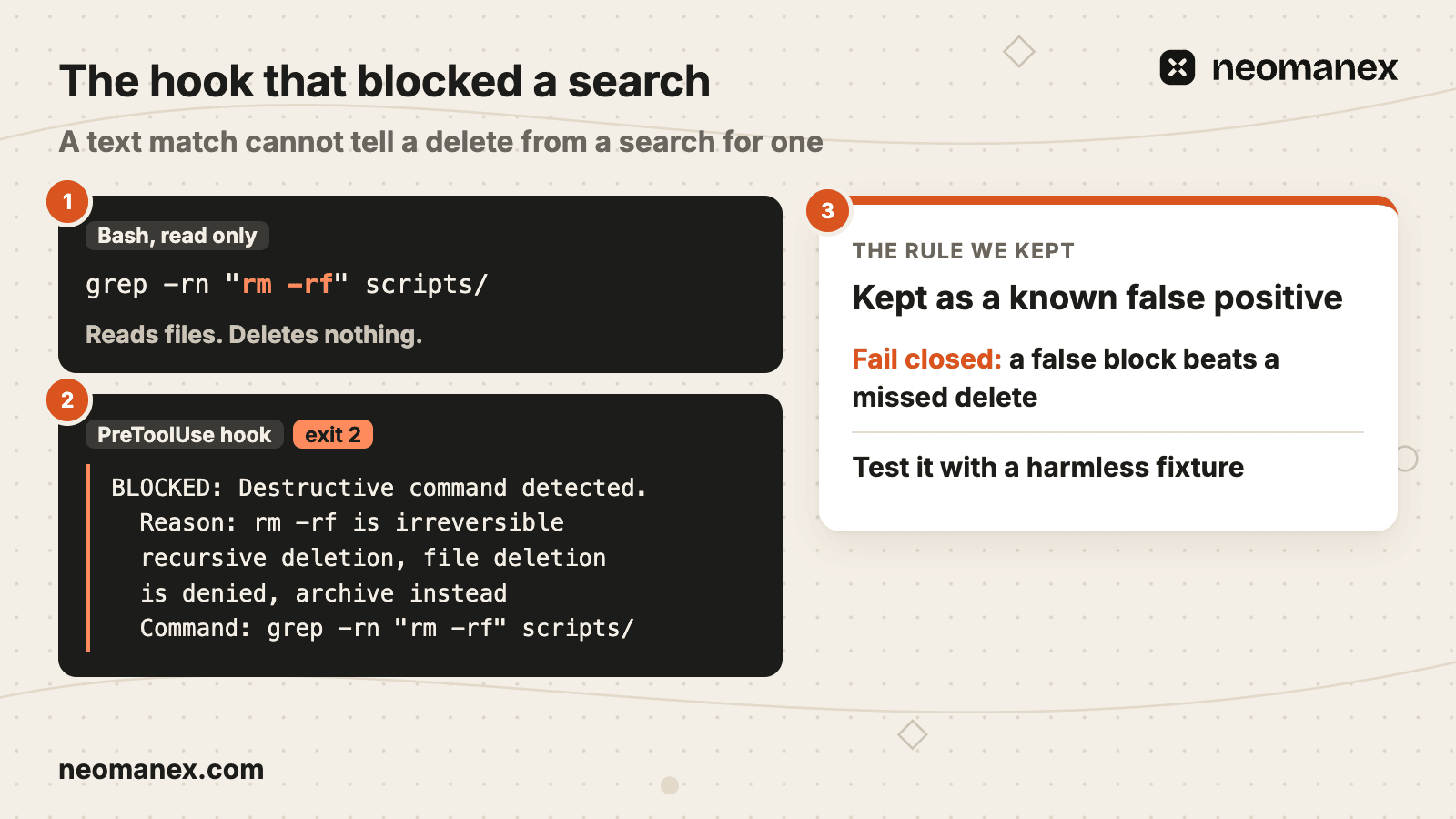
Four failures we hit, each with its rule:
- A search was blocked. A read-only
grep -rn "rm -rf" scripts/matched. Rule: keep the false positive (fail closed) and its fixture. - Commit messages fired the hook. "Never rm -rf exports" matched like a command. Rule: strip quoted
-mand--messagearguments first. - The archive path left the project. Our block message named a folder at our repository root, and a test agent in another project moved its files there. Rule: name
_archive/in this project. - A git command wiped work.
git checkout --on two folders erased uncommitted work. Rule: deny and hook git's delete commands too.
When Nobody Is Watching
Prompts are not a control for unattended runs. Gates and isolation are.
Our unattended runs skip prompts by design. Three controls carry them:
| Control | What it does | What it does not do |
|---|---|---|
| Deny rules and the hook | Block the delete shapes they name in local runs | Catch shapes they do not name |
| Isolated run | Runs each job in its own environment, such as marrowby-run, from pushed commits, so a delete cannot reach your copy | Stop a command inside the run |
| Sign-off step before merge | A person approves before a change, a delete included, reaches main | Stop a command during the run |
Our workflows stop for a sign-off where the risk is (human in the loop), and our site repair loop runs in an isolated environment.
Copy the deny block and the hook today. Then run your unattended agent jobs as ConvOps tasks(opens in new tab), with a sign-off step before merge and an isolated run.
The Same Guard in OpenCode and Kimi Code CLI
One guard shape, three files.
We tested this guard in scratch projects; our day-to-day guard runs in Claude Code.
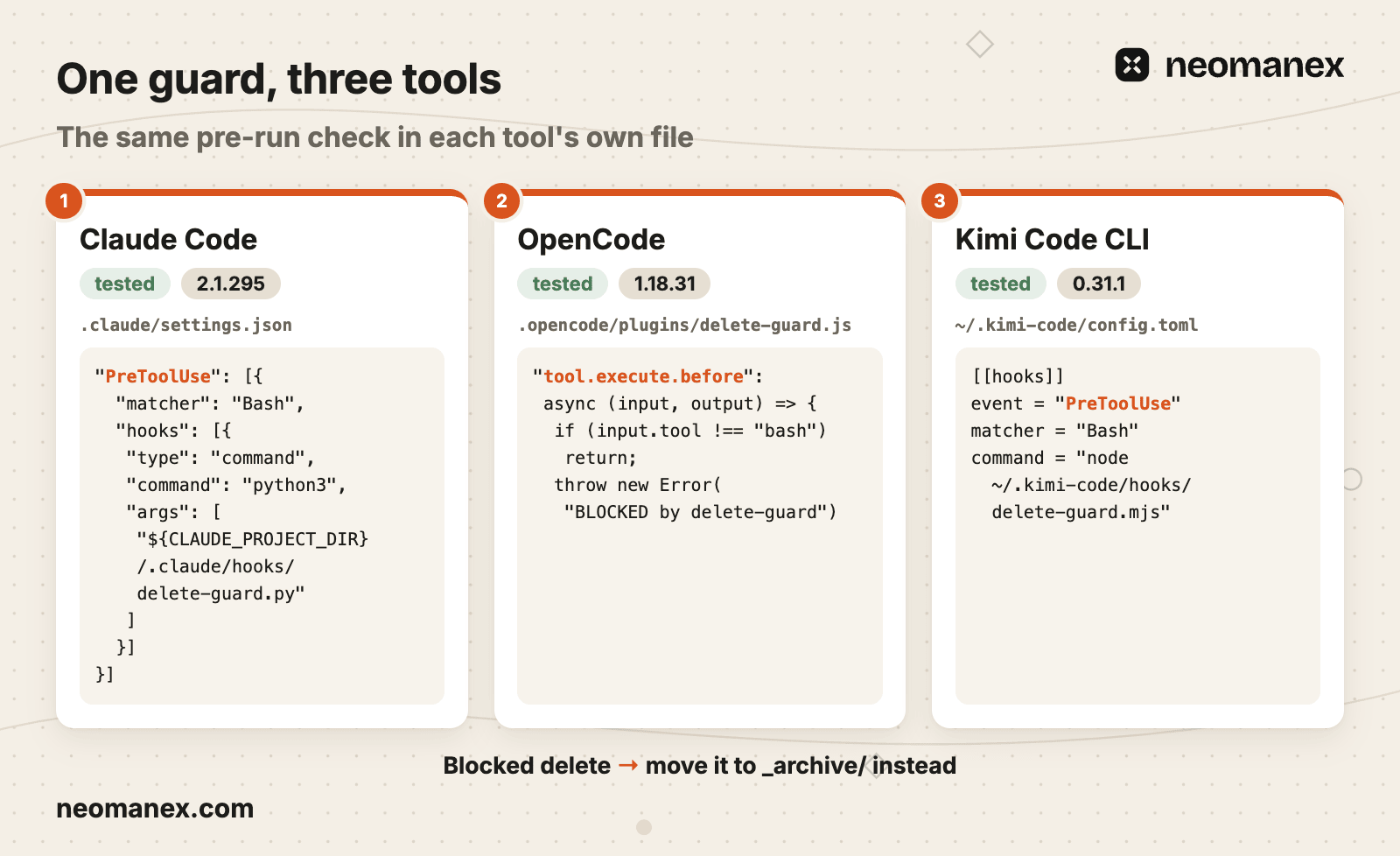
OpenCode 1.18.31
In OpenCode, deny rules in permission.bash stopped rm and find -delete, then the agent deleted with a Python one-liner. A plugin, .opencode/plugins/delete-guard.js, checks every bash command in tool.execute.before, with os.remove and shutil.rmtree among its patterns, and throws a message naming _archive/. It blocked all six shapes we tried, and the agent archived instead. opencode run --pure skips plugins, the guard included.
Kimi Code CLI 0.31.1
Kimi Code CLI (it runs models such as Kimi K3) takes a PreToolUse hook in ~/.kimi-code/config.toml:
[[hooks]]
event = "PreToolUse"
matcher = "Bash"
command = "node ~/.kimi-code/hooks/delete-guard.mjs"
The script exits 2 with the same message and, under yolo, blocked all six shapes. Hooks live only in the user config, never in the project. The native rule Bash(rm *) never matched a path with a slash; Bash(rm */**) does.
Whichever tool you run, the order is the same: push, deny, hook, test.
Steps
Commit and push your work
Run git status, commit everything and push before you start Claude Code. Run risky work in a git worktree or an isolated run that starts from the remote. Deliverable: nothing you care about exists only on your disk.
Add deny rules to Claude Code
Paste a permissions.deny block into the project's .claude/settings.json covering rm, rmdir, git rm, git clean, git reset, git restore, git checkout on a path, git stash drop and clear, and force push. Deliverable: Claude Code refuses those commands, even under --dangerously-skip-permissions.
Add a PreToolUse hook that names the safe path
Save delete-guard.py in .claude/hooks/ and wire it as a PreToolUse hook with the Bash matcher. Deliverable: a matching command exits 2 and the agent reads a message telling it to move the files to _archive/ in this project.
Test the hook with sample JSON
Pipe a sample payload for each delete shape into the script and check the exit code: 2 for deletes, 0 for docker run --rm and for commit messages. Then trigger one live block in a scratch folder. Deliverable: a fixture list that also records the known miss and the known over-block.
Isolate unattended runs
Run scheduled agent jobs in an isolated environment that starts from pushed commits, with a sign-off step before merge. Deliverable: a delete during a run reaches neither your copy nor main without a person's yes. Create a free ConvOps account at https://my.convops.app/register to run them as tasks.
Frequently asked questions
What stops Claude Code from deleting files?
Four layers stop Claude Code from deleting files: an approval prompt, a deny rule in .claude/settings.json, a PreToolUse hook that checks every Bash call, and a way back made of committed, pushed work and isolated runs. Only the last three work in unattended runs, which skip prompts. A deny rule matches command text, so find with -delete and /bin/rm slip past it, and a hook blocks only the patterns it names.
Who needs to stop Claude Code from deleting files?
Developers and teams who run Claude Code on real repositories need a delete guard, most of all when agent jobs run unattended or on a schedule. The outcome is that a delete is blocked, or the work still exists on the remote. ConvOps runs those jobs as tasks with an isolated run and a sign-off step before merge, so a delete made during a run reaches neither your local copy nor main without a person's yes.
Did Claude delete files?
To tell whether Claude Code deleted files, read the session's Bash tool calls for delete shapes: rm, rmdir, find with -delete, git checkout on a path, git reset --hard, git clean, or a python3 -c one-liner. Then run git status to see which tracked files are missing. A file a Bash command removed is gone from disk unless it was committed (pushed or local) or a hook moved it into an _archive/ folder instead.
How to prevent Claude from deleting files?
Commit and push your work before Claude Code starts. Then add deny rules for rm, rmdir and destructive git commands to .claude/settings.json, add a PreToolUse hook that exits with code 2 and tells the agent to move files to _archive/ instead, and test the hook by piping sample JSON into it. Finally, run unattended jobs in isolated runs. Deny rules match command text only, so the hook and pushed work cover what they miss.
Why did Claude delete my projects?
Claude Code deletes files when a task sounds like a reset: asked to start fresh, it clears the folder first, and in our test it chose find with -delete on its own. Git commands that revert work, such as git checkout on a path, git reset --hard or git clean, delete uncommitted changes too. Without a deny rule or a hook, nothing sits between the command and the disk.
Can Claude recover deleted files?
Claude Code gets back only what exists outside the working files: commits, local or pushed (only pushed ones survive a lost or wiped folder), and files a hook redirected into an _archive/ folder instead of deleting them. Uncommitted work removed by a Bash delete or a git revert stays gone. ConvOps isolated runs start from pushed commits in their own environment, so a delete inside one cannot reach your local copy.
Do deny rules still work in bypassPermissions mode?
Yes. In our scratch runs on Claude Code 2.1.295 with --dangerously-skip-permissions, the deny rule Bash(rm *) blocked rm, and a PreToolUse hook exiting with code 2 blocked it too, which matches Anthropic's permission modes docs. The constraint: the same deny rule let find with -delete, /bin/rm and a Python one-liner delete the file, because deny rules match command text, not what a command does.