

What you will be able to do
- Sort your agent jobs into runs alone, waits for a person, and never delegated.
- Name one owner per job and record it on the job.
- Place approval gates inside the workflow at frozen requirements and before going live.
- Write escalation as typed notes that end in a person or a tracked task.
- Schedule reviews and read missed-run flags.
Key takeaways
- An AI governance operating model is a system of decision rights, owners, escalation, workflow gates and reviews that decides what AI agents do alone and what waits for a person.
- Write the list of what an agent must never take on, and make the agent drop that work with a reason.
- Put each approval inside the workflow: an automated check is necessary, a person approves.
- Give every job one owner, and record refusals and stalls on the job instead of reassigning it.
- Review on a schedule, and treat a missed run as a finding, not as silence.
What our AI governance operating model does
An AI governance operating model is a system of decision rights, owners, escalation, workflow gates and reviews that decides what AI agents do alone and what waits for a person. Ours governs agents that act: they triage requests, write code, draft guides and dispatch work to other agents. It is not a staff chatbot policy or a list of approved tools.
Governance for agents is not a committee. It is five things written where the agent reads them before it acts, and each one is an artifact you can open:
| Part | The question it answers | The artifact that answers it |
|---|---|---|
| Decision rights | What may an agent do alone? | A drop list the agent applies, with a reason per drop |
| Ownership | Who owns this job? | One name on the task |
| Escalation | What happens when a job goes wrong? | A typed note that ends with a person or a tracked task |
| Enforcement | What stops a risky change? | An approval step inside the workflow |
| Review cadence | When do we look again? | A schedule that flags its own missed runs |
We run all five on ConvOps(opens in new tab), which holds the tasks, owners, gates, notes and schedules. This guide is part of Loops We Run; the pillar shows who decides what across the whole company.
The examples use Copperfern, a fictional online homeware shop, and Maya, who runs its operations. The names and numbers are invented; the field names, note formats, rules and thresholds are the real ones.

Why the rules live inside the workflow
A policy document governs people who read it. An agent obeys only what sits inside its workflow, so that is where every rule has to live.
Our agents started doing real work: routing, building, publishing, dispatching. The rules lived in a chat thread and in one person's head. An agent in the middle of a run does not reread a policy page. When a job went sideways, nobody could say which agent made the call, on what reason, or where it should have stopped.
So we moved each rule to the point where the agent acts. The list of what an agent may never take on went into the step that picks the work. Every approval became a gate the run cannot pass without a yes. Every agent decision now leaves a one-line reason on the task. Governance is one layer of the wider AI operating model journey.
See how ConvOps puts the approval gate inside the workflow, not in a policy file(opens in new tab).
How it runs
The work between gates runs without us. The gates are where we spend our attention, and nowhere else.
| # | Part | Who runs it | Gate or rule |
|---|---|---|---|
| 1 | Triage and route | Triage agent, alone | Keeps the created type, corrects only task to bug or bug to task. Picks ONE route and records a one-line reason. None fits or ambiguous: asks the operator |
| 2 | Pick the work | An agent | Applies the drop list with a reason per drop. A person approves the candidate list before any agent starts |
| 3 | Name the owner | An agent | One executor per job, recorded on the task |
| 4 | Freeze the requirements | A person | Approval freezes the requirement list |
| 5 | Automated check | CI, then a fix workflow | Red loops back to a fix and the verdict is watched again. Red blocks the merge |
| 6 | Merge | A person, or their written delegation | Green pipeline AND explicit approval |
| 7 | Escalate | The agent that hit the problem | A typed note, a question to the operator, or a bug task |
| 8 | Review | Schedules | Daily, weekly and monthly jobs that flag their own missed runs |
Each rule has a reason. The triage agent never retypes work to or from an initiative without the operator's yes, because scope is a person's call. A dispatch batch holds 1 to 10 tasks, 5 by default, because a small batch keeps each review real. The candidate pool is queried at three times that maximum, so the drops still leave a full list.
An agent stops and asks only for real judgment: production access or production data, secret values or credential rotation, spend, public publishing, scope changes, and a choice between fix options. Everything else it decides, with the reason written down. When the operator grants autonomy for a run, the orchestrator decides as the operator's delegate for that run only, and the notes say so.
The reviews run on a clock, not on memory. At Copperfern: "Search check" daily at 05:00 UTC, "Product photo ideas" daily at 06:00, "Social post" daily at 16:00, "Weekly planning" every Monday at 06:00, and "Monthly research" on the 2nd of each month at 07:00.

Publishing waits for a person unless a person already decided otherwise for that job. Routine content such as news and translations goes live after a separate agent's review, because someone chose that column for the job before it ever ran (which jobs wait for a yes).
Some rules need no gate at all, because a hook blocks the action outright: see how we stop Claude Code deleting files. Gates are for decisions that need a person, which is the core of human in the loop AI systems.
One owner per job, not a RACI
A RACI spreads one job across four roles. For an agent job we record two names: the owner that does the work, recorded as the one executor on the task, and the person who approves at the gate. A job that is refused stays refused: we never retry it on a different executor, and we never dispatch it again while a prior run may still be alive. Shopping a job around hides why it was refused. Each agent also has a row in our AI agent inventory, where the owner column sits next to the off switch that stops it.
A run, step by step: one change, two yeses
The useful part of a governed change is not the code. It is the two moments a person says yes, and the one line of reasoning the agent leaves behind.
Maya asks for "a gift-wrap option at checkout." Here is that request from trigger to verdict:
| # | Step | Who | Output | Gate decision |
|---|---|---|---|---|
| 1 | Trigger | Maya | Task cf-117 "Add gift wrap at checkout", type task, status To do, project shop | Workflow attached |
| 2 | Triage | Triage agent | Type stays task; no other session owns the work | Passes |
| 3 | Route | Triage agent | Condition dev-mr, reason: "changes checkout code in the shop app" | Recorded on the task |
| 4 | Requirements | An agent | FR-1: a shopper can add gift wrap to an order and sees the charge before paying. FR-2: the packing slip shows "gift wrap". Out of scope: gift messages. Executor: coding-agent | Waits for Maya |
| 5 | Gate 1 | Maya | Approves | Requirement list frozen |
| 6 | Build | Coding agent | Works on its own branch | None |
| 7 | Automated check | CI | Pipeline #412 red: one failed job, the packing slip test | red-fix: the fix workflow runs |
| 8 | Check again | CI | Fix pushed; verdict watched again on pipeline #413: green | green: merge-ready verdict recorded |
| 9 | Gate 2 | Maya | Sees FR-1 and FR-2 against what shipped, the acceptance verdicts and pipeline #413 | Approves; merged |
The freeze at step 5 is strict. Later steps never add, drop or reinterpret a requirement. A scope change goes back to the requirements step for a new approval, so the goalposts never move after the yes.
The red check at step 7 never reaches Maya as a question. The fix workflow runs, and the verdict is watched again on the new pipeline. An agent never certifies its own fix, and a red pipeline blocks the merge gate.
At step 9 the merge needs both a green pipeline and an explicit approval. The approval comes from Maya, or from her written delegation when she granted autonomy for that run. Without it, the task sits blocked at the gate and the board shows it waiting on a person. The acceptance verdicts she reads come from a browser test run, described in our acceptance testing guide.
The task keeps the route reason, both passed gates and the CI history.

The drop list and the job record
Write the list of what an agent must never take on before the list of what it may do. The drop list is where governance actually lives.
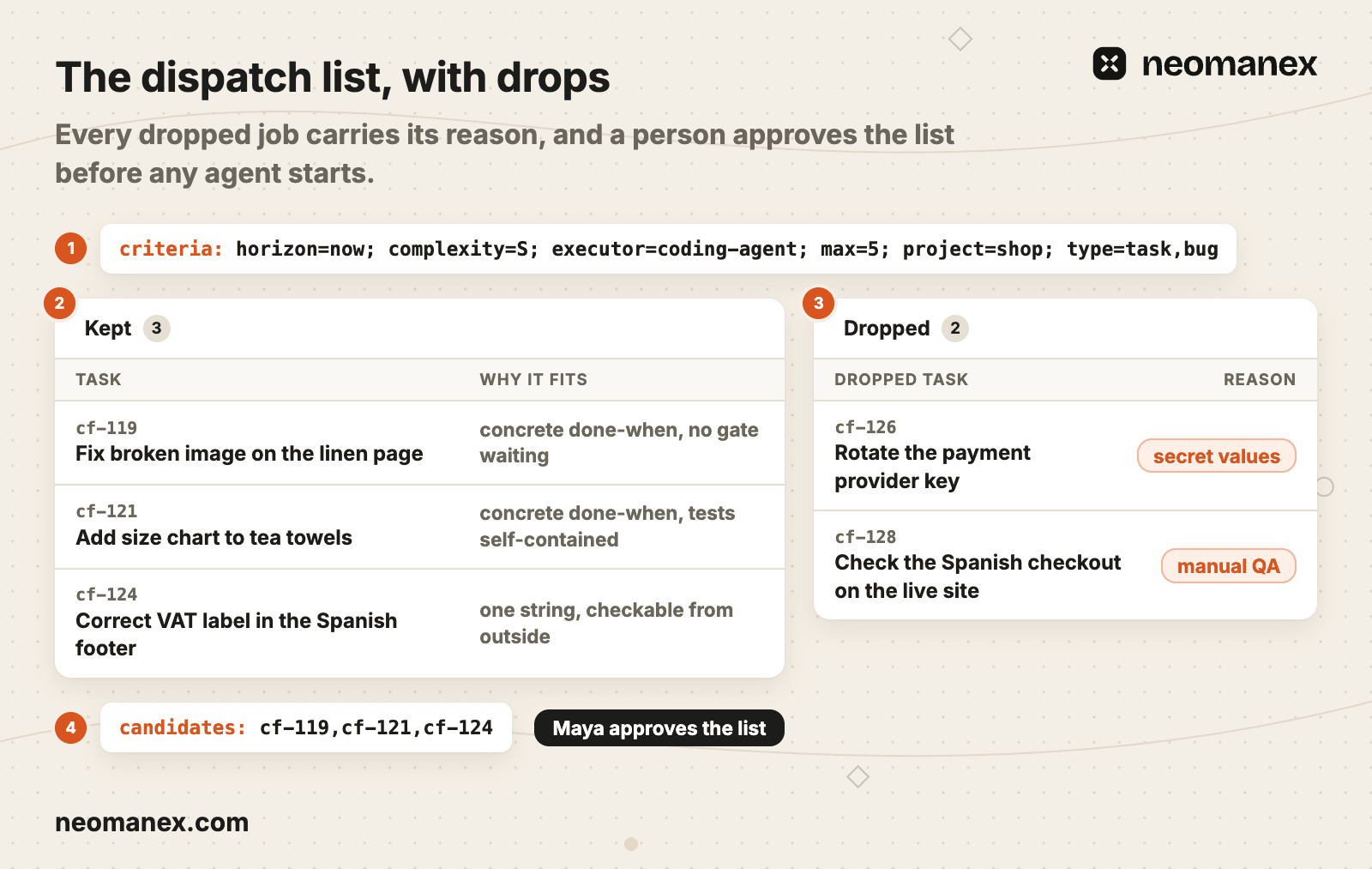
The dispatch list
A dispatch run starts from one criteria line:
criteria: horizon=now; complexity=S; executor=coding-agent; max=5; project=shop; type=task,bug
The agent then builds two tables. Kept tasks carry why each one fits. Dropped tasks carry the rule that dropped them. A task is dropped when:
- a live or dispatched run already exists for it
- it is waiting on an operator gate
- it needs the operator or live production access
- it is tagged
manual-qa,production-release,mr-revieworui-review - it has no concrete done-when
- it is blocked, or the child of a blocked task
- the executor cannot reach what it needs
At Copperfern, "Rotate the payment provider key" drops for secret values, and "Check the Spanish checkout on the live site" drops as manual QA. The gate prompt reads "Approve the candidate list (or trim it) before anything is dispatched." A rejection sends the run back to the criteria.
The job record
Every governed event is one typed line on the job:
| Prefix | Written when | What follows |
|---|---|---|
criteria: | The run starts | The selection values |
candidates: | The list goes to a person for approval | The kept task ids, rewritten if trimmed |
dispatched: | A job gets its owner | Task id and executor |
refused: | The executor declines | The refusal message, verbatim |
review: | The reviewer reads the work | Approved or changes requested, then the findings |
stalled: | A run stops moving | The reason; the operator is told |
outcome: | The job ends | Completed, cancelled or stalled, with the merge request or the reason |
Read the record top to bottom. The reviewer reads the artifact, not the executor's summary: every diff hunk, with the touched tests run again. A changes requested line stops the run, and the same session resumes with the finding. A refusal that is not a known reason, such as an unknown error, becomes a bug task, so escalation ends in a tracked job instead of a chat message.

What goes wrong
The failures worth retelling are the quiet ones. A job that stops running and a filter that returns nothing both look like "all fine."
A daily job that stopped firing
One of our daily jobs stopped firing. Its run history showed only successes, because a run that never starts cannot fail.
The schedule layer caught it. A schedule is flagged missed, with the reason "No run for too long", when the time since its last run passes 1.5 times the longest normal gap in its rule. On a daily job that is 36 hours. A skipped fire does not count as a run. The flag carries the date the silence started and an "Open schedule" link to the fix. The review cadence reports its own gap instead of going quiet.

A filter that returned nothing
In our first dispatch run, the candidate query asked for tasks that were not already dispatched, by negating a status field. That field is empty on every task that was never dispatched. A negated filter on an empty field drops the row, so the query returned an empty list while matching tasks sat in the backlog. Nothing errored, and an empty list reads exactly like "nothing to do."
The rule it produced: never negate a field that can be empty; filter on what you want, not on what you don't. It is written into the step that picks candidates: "Never filter on execution_status, executor or any other nullable field with ne / nin / NOT." The defect itself went in as a bug task. The rule lives in the step, so it holds whatever the query engine does. This is how a failure becomes a rule across all our loops.
Build your own
AI agent governance for a small company starts with one page and one gate. A small company does not need a council. It needs an owner on every job.
The one-page version to copy:
AI governance operating model: <company>
Reviewed: <date>    Page owner: <name>

1. Decision rights
   Runs alone:          triage, routing with a one-line reason, drafting, review passes
   Waits for a person:  frozen requirements, merge, publish, the dispatch list
   Never delegated:     production data, secret values, spend, live-site checks
   Stop and ask:        production, secrets, spend, publishing, scope, a choice of fixes

2. Owners
   <job>   owner: <one agent or person>   approver: <person>

3. Escalation
   refused: <job>: <message, verbatim>    unknown reason: open a bug task
   stalled: <job>: <reason>               tell <person>; never dispatch again while alive

4. Gates
   Requirements: <person> approves, list frozen
   Merge or publish: green check AND <person> or their written delegation

5. Reviews
   <job>   <cadence>   missed after 1.5 times the longest normal gap
Fill it in for the jobs your agents already do. The first gate to add is the one before anything goes live.
Put your first approval gate inside a workflow with a free ConvOps account(opens in new tab). Want it set up inside your company? Book a free Discovery Session.
Steps
List the jobs your agents do
Write down every job an agent runs today: triage, routing, coding, drafting, publishing, dispatching work to other agents.
Sort each job into three columns
Mark each job as runs alone, waits for a person, or never delegated. Production data, secret values, spend and live-site checks go in the never column.
Name one owner per job
Record one owner on each job, an agent or a person, plus the person who approves at its gate. Never retry a refused job on a different owner.
Put the approvals inside the workflow
Add an approval step where requirements are frozen and one before anything goes live. An automated check is necessary there, and a person or their written delegation approves.
Write the escalation lines
Define typed notes for refused and stalled work, the short list of decisions that stop the agent and ask a person, and the rule that an unknown refusal becomes a bug task.
Schedule the reviews and read the missed flags
Put every recurring review on a schedule, daily, weekly or monthly by job, and treat a schedule with no run for 1.5 times its longest normal gap as a finding.
Frequently asked questions
What is an AI governance operating model?
An AI governance operating model is a system of decision rights, owners, escalation, workflow gates and reviews that decides what AI agents do alone and what waits for a person. ConvOps holds all five parts as working records: a task with one owner, a drop list the agent applies with a reason per drop, typed notes for escalation, approval gates inside each workflow, and schedules that flag their own missed runs.
Who is an AI governance operating model for?
It is for founders and operators of small companies whose AI agents triage requests, write code, publish content or dispatch work to other agents. ConvOps gives them one place to run it: risky changes stop at a gate that waits for a person, and the work between gates runs on its own with a written reason for every agent decision.
Who is accountable when an AI agent decides?
One named owner per job is accountable for the work, and a person is accountable at each gate. In ConvOps the owner is the executor recorded on the task, and no run passes a gate without an explicit approval. When the operator delegates a run, the delegate writes that on the task, so a delegated decision is always visible to the operator.
Is RACI outdated for AI agents?
RACI is not outdated, but it is too wide for a single agent job. ConvOps records two names per job instead of four roles: the owner that does the work, recorded as the one executor on the task, and the person who approves at the gate. Refused jobs stay with their owner and are never retried on a different executor, so the reason for the refusal stays visible.
What should an AI agent never do without a person?
An AI agent never touches production access or production data, secret values or credential rotation, spend, public publishing, scope changes or a choice between fix options without a person. In ConvOps the workflow stops at that point and asks the operator. Work that needs live production access or a manual check is dropped from dispatch with its reason written down.
Does a small company need AI governance?
Yes, once its agents act instead of only answering questions. Create a free ConvOps account at my.convops.app/register, then write one page: what runs alone, what waits for a person, what is never delegated, one owner per job, the approval gates, the escalation notes and the review schedule. A small company needs an owner on every job and one gate before anything goes live, not a council.
How often should AI governance be reviewed?
Review at two speeds. ConvOps puts an approval gate at every risky change, such as frozen requirements and a merge, and runs scheduled reviews daily, weekly or monthly depending on the job. A schedule with no run for 1.5 times its longest normal gap, 36 hours on a daily job, is flagged as missed with the reason "No run for too long", so a stopped review surfaces as a finding.