
What you will be able to do
- Lay out the six layers of learning in your own agent stack.
- Type your memories by category and decide what each category feeds.
- Add recall first, Learning Capture last and gap-finding steps to one workflow.
- Set up a capped failure ledger and a monthly consolidation pass.
- Choose the first gate to hand to a logged check, and the ones that never move.
Key takeaways
- A self-improving AI system improves its files, memories and workflow steps, never its model: each finished job's lessons become rules the next job reads.
- It learns in six layers, each a loop: memory, Learning Capture, workflow edits, gap-finding steps, friction filed as it is found, and a pipeline that reviews the whole system.
- Memories are typed by category, and each category feeds a different place: corrections become candidate rules, decisions are recalled, procedures become workflow steps.
- A class-or-one-off test, a failure ledger capped at 15 entries per section and a monthly consolidation keep the rules small enough to read.
- Autonomy is the result: gates move to logged checks as the layers make them predictable, while merges, publishing and irreversible actions stay with a person.
To build a self-improving AI system, leave the model alone and improve everything around it. A self-improving AI system is a repository of standards, a memory store and gated workflows that turn each finished job's lessons into rules the next job reads. The model's weights never change. The system learns in six layers, each a loop that writes a lesson where the next job reads it.
We run all six layers on ConvOps, where our tasks, workflows, gates and memory store live, and we keep evolving them every week. This guide is the build, written for engineering leads, platform engineers and technical founders who run coding or content agents on recurring work. For what an ordinary week looks like in plain language, read the hub of this series, how we run our company with AI agents. Start with Layers 1 and 2 on one workflow you run every week; the rest builds on what they write.
"Self-improving" here is procedural. It is not recursive self-improvement, and nothing retrains. Every lesson lands in a memory, a workflow step or a written standard that a person can read, review and revert. That is the strength of the design: you can see exactly what the system learned, where it wrote it, and who approved it.
Every example uses Copperfern, a fictional online homeware shop selling kitchenware and table linen in English and Spanish at copperfern.example.com. The step names, gates, categories and thresholds are ours. The company, the people and every value are invented. Maya is the person who approves at the Merge gate.
What a self-improving AI system does
A self-improving AI system turns a mistake into a rule once, so no later job repeats it. It stands on three parts: a repository of standards and instruction files the agents read, a memory store every job queries first and writes to as it works, and gated workflows that fix what runs in which order and where a person approves.
On those three parts sit six layers of learning, from basic to advanced. Each layer is a loop: something happens in a job, a lesson is written somewhere, and a later job reads it there.

| Layer | The loop | What it writes | Where the next job reads it | Who approves |
|---|---|---|---|---|
| 1 Memory | Recall before the job, store during and after it | A typed memory: a decision, a correction, a gotcha | The first step of every related job | Nobody: storing is the default |
| 2 Learning Capture | The last step of every workflow stores what the run taught | Memories and routes | Recall, and every layer above | Nobody: the agent decides what is worth keeping |
| 3 Workflow edits | A repeated lesson becomes a line in a step, or a new step | The workflow itself | Every run of that workflow, with no recall needed | A person approves the edit |
| 4 Gap-finding steps | Steps inside the workflow check the work against the standards and write the missing rule | Standards, rule files, instruction files, failure-ledger candidates | The discovery step of every later task, and every plan review | The agent judges a class gap and logs it; a person approves the merge |
| 5 Filed as found | Friction becomes a task the moment it bites; unbreakable rules become hooks | Tasks and hooks | The backlog, and the harness on every tool call | Filing needs nobody; a person sets the horizon |
| 6 Memory pipeline | Reads every category across every workspace, merges, promotes, retires and suggests | Ledger entries, rule proposals, agent and instruction changes | Everything above | Small edits go in directly; new rules need a person |
The lower layers are cheap and see one job. The upper layers are slower and see the whole system. Build them in order, because each upper layer reads what the lower ones write. In consulting terms this is one stage of the AI operating model journey; this guide stays with the mechanics.
Layer 1: memory recalled before every job and stored after
An agent that starts every session from zero repeats every mistake it ever made. Memory is the first loop, and it only works when every job reads before it writes.
What is AI agent memory in a self-improving system? AI agent memory is a store of short typed notes (decisions, corrections, gotchas, procedures and more) that every job queries in its first step and writes to as it works. We run one store for every workspace and every connected agent, Claude Code and OpenCode alike, so a lesson stored in the support space is found by a website task.
Recall first, store as you go
The first step of our workflows starts with recall. One call, context_query, returns two things at once: routes, which record where things live (modules, files, docs), and memories, which record what we know. A narrower call, memory_recall, filters by category, tags and a minimum importance when a step needs only one kind of note.
Storing is memory_store with a category, an importance from 1 to 10 and tags. Recall ranks by meaning, importance and recency, so the agent sets importance by how much a later job loses if it misses the note. A new note that repeats an existing one supersedes it instead of sitting beside it as a duplicate.
Copperfern's checkout task opens by recalling the decision "All dates stored in UTC, shown in the shopper's time zone (March)" and the gotcha "The order email formats dates in its own template". Before the agent writes a line of code, it knows the rule and the trap.
Memories are typed, and each type feeds a different place
The category is the most important field on a memory, because it decides where the lesson goes next. A correction is a candidate rule. A decision is something to recall, not to reopen. A preference belongs in an instruction file, where every session reads it without a query.
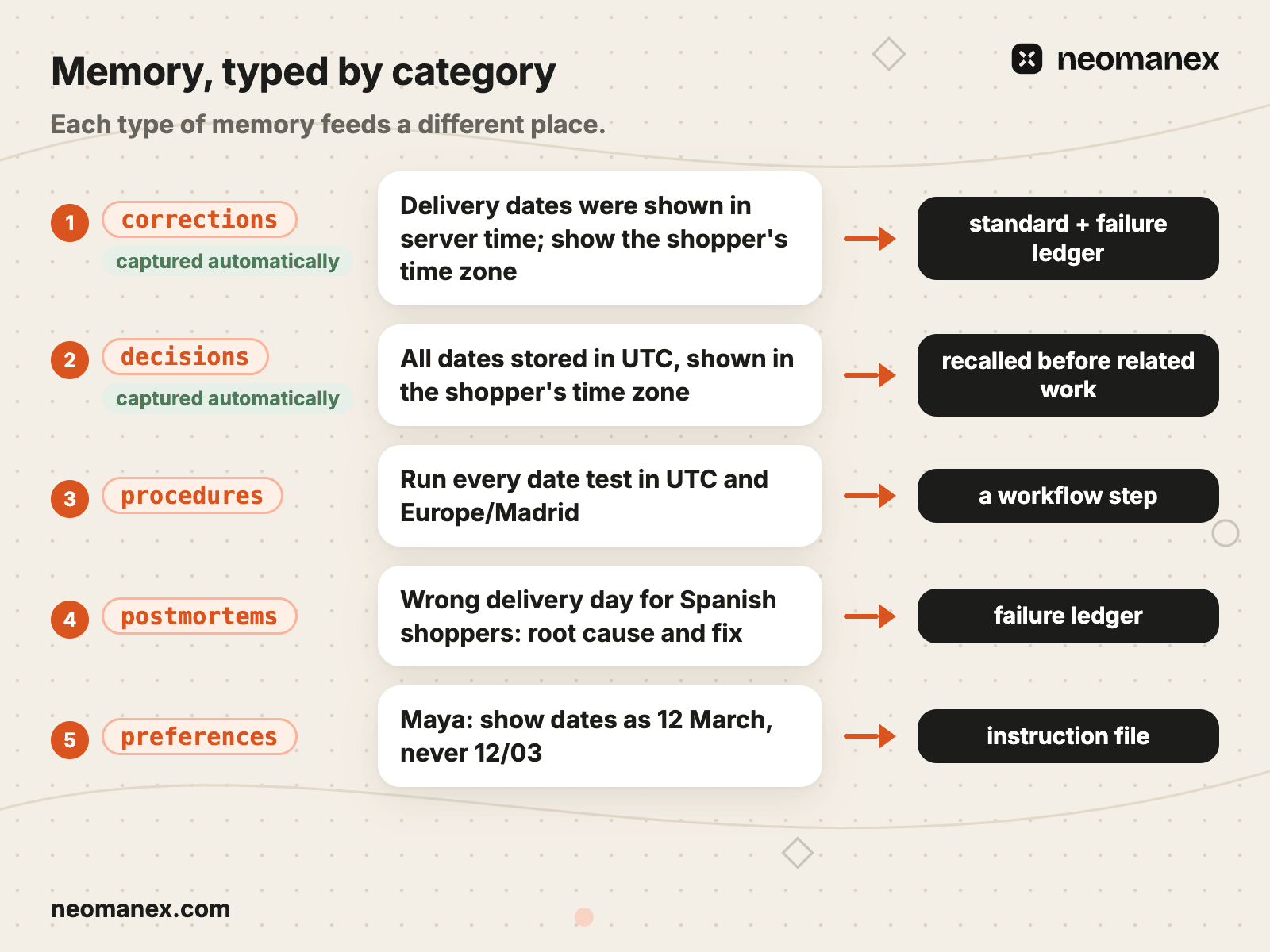
| Category | Copperfern memory | What it feeds next |
|---|---|---|
corrections | "Delivery dates were shown in server time; show the shopper's time zone" | A candidate rule for a standard and the failure ledger |
gotchas | "The order email formats dates in its own template" | A candidate rule; recalled before any date change |
decisions | "All dates stored in UTC, shown in the shopper's time zone (March)" | Recalled before related work |
context | Maya's merge note: "Approved after the Madrid test passed" | Stays on its task, recalled when that work resumes |
procedures, patterns | "Run every date test in UTC and Europe/Madrid" | Workflow steps and standards |
postmortems | "Wrong delivery day for Spanish shoppers: root cause and fix" | The failure ledger |
preferences | "Maya: show dates as 12 March, never 12/03" | Instruction files |
progress | "Delivery-date task merged, branch cleaned" | Stays on its task |
reference, customers, marketing, posts | Domain knowledge kept for its own work | Recalled by domain |
Layer 6 reads across all of these categories at once. That is where a correction in one space and a gotcha in another turn out to be the same lesson.
Some memories capture themselves
Three automatic channels store without anyone asking, as lifecycle events happen. Each one is switched on per workspace, and we run with all three on:
decisions: when a decision step resolves, a task is cancelled, or someone writes a DECISION note.progress: on every step advance and every completion.corrections: when someone writes a BLOCKER note, such as a rejection at a gate.
On top of those, context= notes are written whenever they are passed. The context= parameter on task and workflow calls stores the note as a context memory in the same call as the action. A workspace setting controls it, and it is on by default.
Everything else is stored on purpose. A context= note is 2 to 3 lines, a decision and why, never a status report. A note under 40 characters is not stored at all, because empty notes poison recall, and the floor lives in the store rather than in anyone's discipline.
Task bookkeeping (context and progress) stays on its task. It is stamped and kept out of other tasks' recall by default, so a status line from last month never outranks a decision.
Who approves a memory
Nobody. Storing is the default, and the agent sets the importance. A weak memory is superseded or merged later in Layer 6, never approved in. An approval step here makes agents store less, and a missing lesson costs far more than a noisy one the pipeline merges.
What went wrong with memory, and the rule it produced
Our first memory design had one catch-all category, learnings. Everything ended up there, and recall returned a pile of mixed notes for any query. The rule: learnings is deprecated in our memory standard for new memories, and memories go into specific categories, each with its own job. At Copperfern the same pile held dates, emails and prices side by side; now each note has a type and a destination.
The second failure came after the automatic channels went on. Task bookkeeping outnumbered deliberate knowledge and outranked it in recall. The rule: bookkeeping is stamped and excluded from cross-task recall by default, and every new capture channel ships with a recall weight, an eligibility class and a configurable importance.
If your agents start every session from zero, build this layer first. ConvOps is where we run it: workflows with a recall step first and Learning Capture last, and one memory store every connected agent reads. See how ConvOps works(opens in new tab).
Layer 2: Learning Capture, the last step of every workflow
If storing a lesson depends on the agent remembering to do it, it does not happen. So in our system it is a step, and it is the last one on every workflow.
Learning Capture is a global step. We define it once, and the workflow engine appends it, followed by Complete, to every workflow in scope. Nobody adds it to a new workflow by hand, and nobody can forget it. Fix workflows, and the workflows that run single phases of a larger plan, sit outside its scope.
The step tells the agent:
Capture learnings from this workflow execution. Store decisions, gotchas, patterns via memory_store(). Index new code paths as routes if significant code areas were created: route_create for a new area, or route_update to extend an existing one. Query the existing route first and merge paths yourself, since route_update replaces each field you send. If nothing noteworthy happened, skip with "no learnings to store".
Three design choices sit in that text:
- It names the categories. Decisions, gotchas, patterns: the agent stores typed memories, not a diary of the run.
- It indexes new code as routes. The next job's recall says where the code lives as well as what we know about it.
- It allows a skip. A run with nothing new stores nothing, by design. A forced note on every run is the bookkeeping flood from Layer 1 coming back.
Workflows with their own learning step run both. Our improve cycle (Layer 3) has a Learn step that stores what each cycle taught, and the global Learning Capture still runs before Complete.
Learning Capture feeds three places: the store that Layer 1 recalls, the workflow edits of Layer 3, and the pipeline of Layer 6. Nobody approves it; the agent decides what is worth keeping.
Copperfern's delivery-date task ends with Learning Capture storing the gotcha "Server time zone leaks into delivery dates; test in Europe/Madrid" and a route for the new date-formatting module. The next date task finds both in its first step: what to test, and where the code is.
What went wrong. Sessions edited files and ended with nothing stored. A step at the end of a workflow cannot catch work done outside a workflow, or a session that stops before its last step. The rule: a Stop hook in the agent harness (in Claude Code, a script that runs each time the agent stops) checks every 2 assistant turns whether the session stored anything. A session that edited files with nothing stored is flagged at once, without waiting for the turn count. The protocol never depends on anyone's memory, the agent's included.
Layer 3: workflows that edit themselves
A lesson that only lives in memory depends on recall finding it. A lesson written into the step is read every time the job reaches that step. So the third layer turns what Learning Capture found into an edit of the workflow itself: a sharper instruction, a new step, a new gate, a bounded loop.
This is why we keep procedures in workflows rather than one long instruction file. A workflow is a graph of steps, so a lesson goes into the one step that needs it, not into a file every step has to read (the idea behind graph engineering).
How a step changes
Edits are surgical: one step at a time, never a rebuild of a live workflow. Each edit lands only with zero validation warnings, and is then read back from the engine to confirm the step says what was intended. Before a structural change, such as moving or removing a step, the runs in flight are checked, so no live task finds its next step gone.
Step text holds procedure only: what the executor does at that step. The reason for a change goes to a memory, never into the step. A step full of history is a step agents skim.
Copperfern's development workflow learns from the delivery-date lesson in one line:
Implement
  (existing instructions unchanged)
+ Run every date test in UTC and Europe/Madrid.
From then on, every task that reaches Implement reads the line. No recall has to rank it, and no agent has to remember it.
A person approves workflow edits. The agent proposes the change and, once approved, makes the surgical edit. A one-line fix to a standard or instruction file that a step points to goes in directly under our instruction-file standard (Layer 5 sets out where that line falls).
The improve cycle: one improvement per cycle
Some work improves a deliverable instead of finishing a task: a page, a piece of copy, a recurring audit. For that we run the Autonomous Cycle workflow, a loop that edits its own output one change at a time.
| Step | What it does |
|---|---|
| Analyze | Recalls prior lessons for this deliverable (minimum importance 5, at most 10) and writes an analysis |
| Validate | Recalls past decisions (up to 10) and gotchas (up to 5). If the analysis is flawed or repeats a past decision, it writes why and sends the cycle back to Analyze |
| Plan | Picks the single highest-impact improvement. One per cycle, done well |
| Execute | Makes that one change |
| Learn | Stores what the cycle taught |
| Continue? | improve-more schedules the next cycle one minute out; done closes the run. A cycle cap, when the run sets one, stops it |
Learning Capture and Complete follow, as on every workflow. One improvement per cycle keeps each step small and checkable: a cycle that changes five things cannot tell which one helped. Validate's jump back to Analyze stops the loop from proposing what was already decided against.
What went wrong with workflows, and the rules it produced
Our guides shipped in English only after a separate translation job stopped running, and nothing in the guide workflow noticed. The rule: translation became a step inside the guide workflow, followed by a translation judge that must return zero findings for every locale. At Copperfern the Spanish pages lagged the English ones for the same reason; now the page workflow translates and judges before it can publish.
Review steps also looped without converging, each round finding something new. The rule: every review rejects to a revise step, and after 2 rounds it files a bug and stops instead of running a third. A looping review burns runs; a bug brings a person in with the evidence.
Layer 4: steps that find gaps and fix the standards
The best place to find a missing rule is the workflow that just needed it. So our development workflow carries its own gap-finding steps. They check the work against the standards, find where a standard is missing or weak, and write the fix back before the next task starts.
The workflow is Development Task (MR flow). These are the steps that matter for this layer, in order, with the five gap-finding steps numbered as in the image below. Other steps, such as use-case documentation, the push and the CI checks, run in between:
Functional Analysis (a person approves; the requirement list freezes) → 1 Discover Standards & Flag Gaps → Technical Analysis → 2 Traceability Check (one pass) → Implement → 3 Check Standards Compliance and Compliance Decision → 4 Terminal Gap Check → Update Documentation → Merge (Verification Review + CI Green + Operator) → Standards Check? → 5 Standards Capture → Learning Capture → Complete.

1. Discover Standards & Flag Gaps
Before any design, a standards-discovery agent reads our routing files (one per team, the single source of truth for which standards apply to which work) and produces the list of standards that govern this task. The same pass opens each standard and flags a gap when:
- no standard covers the area at all
- a standard exists but misses the pattern this work needs
- a standard is outdated or contradicts practice
- the work introduces a new pattern no standard addresses
- a standards file exists that no routing file reaches
With zero gaps, the step says so and advances without waiting. With any gap, it stops, and a person decides per gap: create a task, expand an existing standard, or accept the risk. On advance, the list is locked for this work. Every later check runs against the locked list, so nobody moves the goalposts halfway through.
2. Traceability Check (one pass)
After Technical Analysis, a gap analyzer runs one pass over a closed four-item checklist. One pass, never a loop. Blockers from the first three items are fixed in place, the fourth item stops for a person, and anything else goes to the task's watchlist of known risks instead of into another review round.
3. Check Standards Compliance and Compliance Decision
After Implement, a standards reviewer checks the change against the locked list. Compliance Decision reads the report:
| Finding | What happens |
|---|---|
| HIGH or MEDIUM | The fix workflow runs once. The reviewer is not re-run: the proof is the fixer's own evidence (lint, type check and the touched unit tests green), quoted in the task notes |
| LOW, one line | Fixed inline |
| LOW, more than one line | Searched for an existing task, else filed as a task tagged discovered-during-execution, citing file, line and standard |
| Pre-existing | Never fixed here |
The step passes with zero HIGH and zero MEDIUM findings open.
4. Terminal Gap Check
Before documentation and merge, the Terminal Gap Check does three things. Every watchlist item from step 2 is closed: a risk that materialized is fixed now, one that did not gets a one-line disposition. Every requirement maps to its shipped proof, and a requirement with no proof gets a test now or stops for a person. And every execution failure nothing predicted is stored as a failure-pattern memory at importance 7: those are the failure-ledger candidates.
Update Documentation follows, written by a documentation agent from the diff. After the push and the CI checks comes the Merge gate: it needs a green pipeline and a person's approval, both. It is the single operator checkpoint between the approved analysis and the merge, and a red pipeline means fixing the cause, never merging past it.
5. Standards Check? and Standards Capture
After the merge, Standards Check? decides whether the fix teaches the standards something. Yes when a bug was fixed that could represent a class of mistakes, when a missing or weak standard could have prevented the issue, or when the change revealed a gap in the standards. No for a plain feature, a refactor with no behaviour change, or a documentation-only change.
Yes runs Standards Capture, three steps:
- Assess Standards Gap reads the standards, the agent rule files and the instruction files. It returns "No gap" with a one-line reason, or "Gap found" with the exact file, the rule, why, and draft wording. It recommends a rule only when the bug represents a class of mistakes a rule would catch, never for a one-off.
- Standards Judgment is the agent's own call, with no operator approval. Before it advances, it must log the outcome as an activity. That log replaced a person's sign-off, and it is the audit trail.
- Apply Standard runs only when the gap was judged warranted. A documentation agent writes the rule, then re-reads the file to verify the edit landed.
The class test is what keeps the standards readable. A rule for every one-off bug bloats a standard until no agent reads it closely.
Copperfern's delivery-date fix goes through it like this:
Standards Check?   yes
Assess             Gap found. Class: any date shown to a shopper can leak server time
Judgment (logged)  Standards judgment: applied dates-and-times.md, shopper time zone
Apply              dates-and-times.md v1.2
                   Store UTC; render in the shopper's time zone;
                   every date test runs in two time zones
Standards Capture edits standards, rule files and instruction files. Workflow fixes come through Layer 3. Changes to agent definitions come from what these steps find and from the suggestions of Layer 6.
The failure ledger: the rubric for plan reviews
What is a failure ledger? A failure ledger is a curated list of falsifiable failure patterns, each taken from a real incident, that plan reviews audit against. Every entry has four fields: ID, Pattern, Check and Incident. A reviewer returns PASS, FAIL or N/A per entry, and reads only the Global section and its own project's section.
| ID | Pattern | Check | Incident |
|---|---|---|---|
FL-P1 | Date shown without the shopper's time zone | Every date in the plan names its time zone | Delivery date on product pages |
| Ledger rule | Value | Why |
|---|---|---|
| Admission | Real incidents only; candidates promoted on consolidation, never mid-review | A ledger of imagined risks is a wish list |
| Section cap | 15 entries; at the cap, overlapping entries merge before a new one goes in | "The cap is the forcing function" |
| Retirement | Only PASS or N/A across 5 consecutive plans: moved to Retired on consolidation | A check that never fires costs every review |
| Where it is checked | The review of the next plan | The development workflow feeds candidates; plan reviews read the ledger |
What went wrong. A plan review ran round after round, each round finding something new, and never converged. The rule: reviews audit against a curated ledger of falsifiable patterns from real incidents, every finding backed by its incident, with a cap per section and bounded rounds.
Layer 5: improvements filed as the work happens
The cheapest moment to record a friction is the moment it bites. A lesson remembered at the end of the week is already half lost. So any suggestion to improve a loop, a step, a standard or a tool is filed as a task the moment it is found, and the work continues.
The rule lives in our root instruction file. An action that was not one-shot (a test failing the first time, a hidden prerequisite, a missing setup, an undocumented step) is alerted to a person, searched for an existing task, and filed tagged discovered-during-execution only if none matches. Every such task sits under one engineering-health goal, whatever project it came from, so friction has one home and one backlog.
Compliance Decision applies the same rule inside a workflow: a LOW finding bigger than one line becomes a task, never a reason to stall the merge.
While fixing the delivery date, Copperfern's agent finds that the order email formats dates in its own template. It files "Order email ignores the shopper's time zone", tagged discovered-during-execution, and finishes the task it was on. The email gets its own task, its own review and its own merge.
Filing needs no approval. A person sets the horizon: now, next or later. When the fix is a small edit to an instruction file, a standard or a protocol (a line, a stale value, a typo, with no new rule and no design choice), the agent makes it directly under our instruction-file standard, then commits and pushes. A new rule, a restructure, or anything that changes how agents behave is proposed first and approved by a person. That split keeps instruction files short: they route to standards, they never hold them (why a long CLAUDE.md is a symptom).
Hooks: the rules that never depend on memory
Some rules are too important to live in a prompt. Your agent harness's hooks run before or after tool calls and when the agent stops, so they enforce a rule whether or not the agent recalls it. Three of the hooks we run in Claude Code:
| Hook | When it runs | What it enforces |
|---|---|---|
| Destructive command block | Before every shell command | Deletion is blocked before it runs, and files are archived instead (how we stop deletions) |
| Git drift check | When the session stops | Uncommitted or unpushed work keeps the session from ending |
| Memory check | When the session stops, every 2 assistant turns | Edited files with nothing stored are flagged at once |
Filed tasks feed the backlog, where each is fixed as its own task. They feed Layer 6, which reads filed issues alongside memories. And when the fix is a step or a standard, they feed Layers 3 and 4.
What went wrong. A standards loop of check, fix and re-check kept finding new LOW findings, round after round, until a person stopped it while the actual task waited. The rule: HIGH and MEDIUM findings are fixed once, with no re-review. A LOW finding is fixed inline when it is one line, and otherwise filed as a task. At Copperfern the same loop would have held the delivery-date fix behind comment wording; under the rule, the wording goes to a task and the fix merges.
Layer 6: the memory pipeline that reviews the whole system
Each layer below sees one job. This one sees all of them, and that is where the patterns no single job can see show up.
The memory pipeline reads every category of memory, every decision and every filed issue across all workspaces. It merges what repeats, keeps the ledger honest, and suggests improvements to the whole system: standards, workflows, agent definitions and instruction files.
The mechanics:
- Consolidation runs
memory_consolidatemonthly on each active category: a dry run first, so a person can read what merges, then a merge of memories at 0.85 similarity or higher. That threshold merges near-duplicates and keeps distinct lessons apart. - Supersede chains replace an old memory with its newer version instead of keeping both.
expires_atremoves time-bound context when it stops being true.- Ledger housekeeping promotes
failure-patterncandidates into the ledger, never mid-review, and moves entries with 5 clean consecutive plans to Retired.
Each suggestion lands where it belongs, with its own approver:
| Suggestion | Lands as | Who approves |
|---|---|---|
| A failure-pattern candidate | A ledger entry | Promoted on consolidation |
| A ledger entry that never fires | An entry in Retired | Moved on consolidation by the ledger rule |
| A small fix to an instruction file, standard or protocol | A direct edit | The agent, under the instruction-file standard |
| A new rule or a restructure | A proposal | A person |
| A workflow change | A Layer 3 edit | A person |
| A line for an agent definition | A proposal | A person |
Copperfern's consolidation reads corrections and gotchas across the website and support spaces. It finds three date and time-zone corrections, merges them, and promotes the ledger entry FL-P1. It also proposes one line for the implementation agent's definition, "Never render a date without the shopper's time zone", and Maya approves it.
What went wrong. Both Layer 1 failures, the catch-all category and the bookkeeping flood, first surfaced here, as recall that returned noise. From one job that noise looks like bad luck; across the whole store it is a pattern with a cause, and only this layer sees the whole store.
AI agents that learn from mistakes: one lesson up six layers
AI agents that learn from mistakes do it by writing the lesson in more than one place. Here is one Copperfern lesson, from a rejected merge to the next task passing. The task is "Show the delivery date on product pages", on the Development Task (MR flow) workflow.

- Trigger. At the Merge gate, Maya rejects with a BLOCKER note: "Spanish shoppers see tomorrow's date as today."
- Layer 1, memory. The BLOCKER note is captured automatically as a
correctionsmemory: "Delivery dates were shown in server time; show the shopper's time zone." - Layer 2, Learning Capture. The fixed task ends by storing the gotcha "Server time zone leaks into delivery dates; test in Europe/Madrid", plus a route to the date-formatting module.
- Layer 3, workflow edit. The Implement step gains "Run every date test in UTC and Europe/Madrid".
- Layer 4, gap steps. Standards Check? says yes. Assess finds a class: any date shown to a shopper can leak server time. The judgment is logged, and
dates-and-times.mdv1.2 gets the rule "Store UTC; render in the shopper's time zone; every date test runs in two time zones", re-read after writing. The Terminal Gap Check stored thefailure-patterncandidate. - Layer 5, filed. "Order email ignores the shopper's time zone" is filed, tagged
discovered-during-execution. - Layer 6, pipeline. Consolidation merges three time-zone corrections across website and support, promotes
FL-P1, and proposes "Never render a date without the shopper's time zone" for the implementation agent. Maya approves the line. - Next task. "Show pickup slots" starts. Its first step recalls the UTC decision. Discover Standards & Flag Gaps lists
dates-and-times.md. Check Standards Compliance passes. The review of the plan it belongs to checksFL-P1: PASS. Maya approves at Merge.
The next task passes because six layers wrote the lesson in six places, not because the model changed. If recall misses the memory, the step line is there. If a new agent skips the step, the standard is in its locked list. If the plan drifts, the ledger catches it.
What autonomy looks like after the layers
Autonomy is not a setting we turn up. It is what remains when the layers below have made a gate's decision predictable. A gate moves from a person's sign-off to a logged check only when that is true, and the decision stays logged so a person can read it (how we read agent decisions).

| Moved from a person's sign-off to a logged check | Never moves |
|---|---|
| Standards Judgment on a class gap: the agent decides and logs an activity a person reads | The Merge gate for code: green pipeline and a person's approval |
| Standards compliance: HIGH and MEDIUM fixed once with the fixer's evidence, no second review | Publishing a guide |
| Review rounds: a failing review goes to a revise step, then a bug after 2 rounds | Force-push, history rewrite and public release tags |
| Gates pre-approved for one run when a person says "go autonomous" | File deletion: blocked by a hook, archived instead |
| Small fixes to published pages, re-checked live, with anything else held for a person (the self-healing loop) | New rules and restructures of instruction files and protocols |
Standards Judgment is the clearest case. It used to wait for a person. The class test in Assess, the standards it reads, and the re-read in Apply made its outcome predictable enough that a logged decision now replaces the sign-off. Copperfern's activity reads "Standards judgment: applied dates-and-times.md, shopper time zone", and Maya reads it whenever she wants. The merge still waits for her.
The right-hand column is a design choice, not a maturity gap. Those actions are irreversible or public, and a logged decision after the fact cannot undo them. Where a person stays in the loop, it is because the risk is there (building human-in-the-loop AI systems).
What goes wrong when you build self-improving AI agents
Every rule in this system came from a failure we hit. Here they are in one place, with the layer each one changed.
| Failure | Rule it produced | Layer |
|---|---|---|
| One catch-all memory category; recall returned noise | Specific categories; learnings deprecated for new memories | 1, 6 |
| Task bookkeeping outnumbered deliberate knowledge in recall | Bookkeeping stays on its task, out of cross-task recall | 1, 6 |
| Sessions edited files and stored nothing | Stop hook flags edits with no memory, at once | 2, 5 |
| Guides shipped in English only | Translation as a workflow step, with a judge | 3 |
| Reviews looped without converging | Failure ledger, revise steps, a bug after 2 rounds | 3, 4 |
| A standards loop kept finding new LOW findings | HIGH and MEDIUM fixed once; LOW inline or filed | 5 |
| A brief planned a picture for every paragraph | An image budget in the guide standard | 4 |
The last row shows the same loop working on content, not code. A guide brief planned far more images than any reader needs, and no rule set a ceiling. A person rejected it at the Brief gate, and because every brief plans images, the fix went into the standard rather than into that one brief: the guide standard gained an image budget of at most 8 images for a loop guide and 6 for any other guide, hero included. At Copperfern, the same rule would have trimmed a buying-guide brief that planned a picture for every paragraph down to the few that explain something text cannot.
The pattern behind every row is the same. The failure happened once, someone wrote the rule in the layer that would have caught it, and the next job read the rule instead of rediscovering the failure. Our SEO experiments loop grew its rules the same way.
Build your own AI operating system, one layer at a time
You do not need all six layers on day one. Layers 1 and 2 come first, because every upper layer reads what they write. Add the gap-finding steps once you have standards worth checking against, and the pipeline once your store holds enough memories to repeat itself.
The six steps below follow the layers in order. Each one works with any agent harness; ConvOps is the example, because it is where we run ours. Create a free ConvOps account(opens in new tab) and connect your agent(opens in new tab) to follow along.
Steps
Give every job a memory
Put a recall step first on every workflow and store typed memories as the job runs: decisions, corrections, gotchas, procedures. Decide what each category feeds. Turn on automatic capture of decisions, progress and corrections, which stays off until you switch it on for your workspace.
Make Learning Capture the last step
Add one global last step to every workflow that stores decisions, gotchas and patterns and records where new code lives. Let it skip with "no learnings to store" when a run taught nothing new.
Edit the workflow, not the prompt
Turn each repeated lesson into one line in the step that needed it, or into a new step. Make one surgical edit at a time, validate it, read it back, and keep the reason in a memory, not in the step.
Add gap-finding steps
Discover the governing standards before the work and flag gaps, check compliance after it, and run a terminal gap check that stores failure-pattern candidates. Assess every fix as a class or a one-off, and keep a failure ledger of real incidents, capped at 15 entries per section, for plan reviews.
File friction the moment it bites
When anything is not one-shot, alert a person, search for an existing task and file one tagged discovered-during-execution, then finish the task you are on. Move the rules that must never fail, such as blocking file deletion, into your agent harness's hooks.
Run the memory pipeline and move one gate
Consolidate memories monthly per category with a dry run first, promote ledger candidates, retire entries that never fire, and propose changes to standards, workflows, agents and instruction files. Then hand one predictable gate to a logged agent decision, and keep merges and publishing with a person. Create a free ConvOps account at https://my.convops.app/register and connect your agent at https://convops.app/connect. Want it built with your team? Book a free Discovery Session at https://neomanex.com/services.
Frequently asked questions
What is a self-improving AI system?
A self-improving AI system is a repository of standards, a memory store and gated workflows that turn each finished job's lessons into rules the next job reads. ConvOps holds the workflows, gates and memory store we run ours on. It learns in six layers, from memory recalled before every job to a pipeline that reviews the whole system. The model never changes; the files, steps and memories around it do.
Who is a self-improving AI system for?
A self-improving AI system is for engineering leads, platform and ops engineers and technical founders who run AI agents on recurring work in development, content or operations. ConvOps runs that work as tasks on gated workflows, so a repeated mistake becomes a written rule with a record of who approved it, and the next job reads that rule before it starts.
Is a self-improving AI possible without retraining the model?
Yes. In ConvOps the lessons land as typed memories, workflow steps and written standards, and the model's weights are never touched, so every lesson stays readable and reversible. The system does not edit the model or its own guardrails: a person approves merges, publishing, new rules and restructures of instruction files, and a hook blocks file deletion.
How do I build a self-improving AI system?
Create a free ConvOps account at my.convops.app/register and connect the agent you already use. Then put a recall step first and a Learning Capture step last on one workflow, and turn on automatic capture of decisions and corrections. Add gap-finding steps that check the work against your standards, file friction as tasks the moment it appears, and run a monthly consolidation over your memories.
How do you stop the rules and memories from growing without limit?
ConvOps keeps memories in specific categories, supersedes repeats when they are stored and merges near-duplicates in a monthly consolidation at 0.85 similarity. Task bookkeeping stays out of cross-task recall. A standard gains a rule only for a class of mistakes, never a one-off. The failure ledger holds at most 15 entries per section, and an entry that returns only PASS or N/A across 5 consecutive plans is retired.
Who approves a change to the rules?
In ConvOps it depends on the layer. Agents store memories without approval. A class gap in the standards is judged by the agent and logged as an activity a person can read. Small edits to instruction files and standards, such as a line or a stale value, go in directly under a standard. New rules, restructures and workflow changes need a person, and merges and publishing always wait for one.
How is a self-improving AI system different from a learnings file?
A learnings file is one catch-all that grows without limit, which is why we deprecated our own learnings memory category for new memories. In ConvOps each lesson is typed and lands in the layer that uses it: a recalled decision, a workflow step, a standard or a failure-ledger entry. It is capped and consolidated, and recall returns only the memories that match the job.